DB Settings
After creating Laravel project with Composer, you need to modify two files to set DB environment.
- /.env will have multiple DB setting as below or similar. On the example below show two schema of sigma and cms.
DB_CONNECTION=mysql
DB_HOST=127.0.0.1
DB_PORT=3306
DB_DATABASE1=mysql1
DB_USERNAME1=user1
DB_PASSWORD1=password1
DB_DATABASE2=mysql2
DB_USERNAME1=user2
DB_PASSWORD1=password2
/config/database.php defines connections with environmental variables sourced from .env file.
'mysql1' => [
    'driver' => 'mysql',
    ...
    'host' => env('DB_HOST', '127.0.0.1'),
    'username' => env('DB_USERNAME1','root'),
    ...
],
'mysql2' => {
    'driver' => 'mysql',
    ...
    'host' => env('DB_HOST', '127.0.0.1'),
    'username' => env('DB_USERNAME1','root'),
    ...
],
‘mysql1’ connection has setting for connecting to ‘mysql1’ schema. ‘mysql2’ connection has setting for connecting to ‘mysql2’ schema. Now, your Laravel project is ready to connect to defined DBs.
Generating Migrates
Install Laravel Schema package to generate migrates as below.
composer require --dev "kitloong/laravel-migrations-generator"The detailed instructions for this package can be found from https://github.com/kitloong/laravel-migrations-generator
Then, you can generate migrate for each DB or connection.
php artisan migrate:generate --connection="mysql1"
php artisan migrate:generate --connection="mysql2"
Migrates will be generated /database/migration/
Those migrates are no use for now to be precise. They will be useful when we need to change tables and/or columns. It will keep history of changes for DB.
Creating Models
Finally, you will create models for every table. I am planing to automate this by creating composer package. For now, you can create each model as below.
php artisan make:model School -a
php artisan make:model msContest -a
‘-a’ options will create all of related class like Factory, Migration, Seeder, Request, Controller and Policy. Details are available on https://laravel.com/docs/11.x/eloquent#generating-model-classes
Model class can be found in /app/Models. You may add connection and table name as below.
<?php

namespace App\Models;

use Illuminate\Database\Eloquent\Factories\HasFactory;
use Illuminate\Database\Eloquent\Model;

class School extends Model
{
    use HasFactory;
    protected $connection = 'mysql';
    protected $table = 's_school';

    protected $fillable = ['name', 'email', 'school_number'];

}
/app/Models/School.php
<?php

namespace App\Models;

use Illuminate\Database\Eloquent\Factories\HasFactory;
use Illuminate\Database\Eloquent\Model;

class msContest extends Model
{
    use HasFactory;
    protected $connection = 'cms';
    protected $table = 'ms_contest';

    protected $fillable = ['contest_event', 'contest_name', 'contest_year'];


}
/app/Models/msContest.php
Testing Models
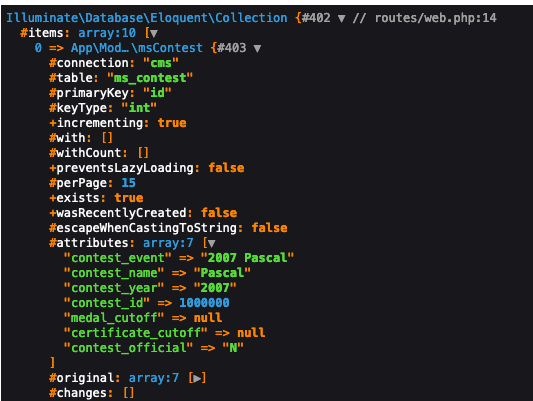
It is easy to dump responses on the root route to see if values are retrieved from DB. During development, you can dump them on your View or somewhere else. Here is the laziest way to do this.
You can open web.php page in /routes directory that stores all of web routes. Change route for ‘/’ and dump variable there. Do not forget including two Models
<?php

use App\Http\Controllers\ProfileController;
use App\Models\msContest;
use Illuminate\Support\Facades\Route;
use App\Models\School;

// Route::get('/', function () {
//     return view('welcome');
// });

Route::get('/', function () {
    $contests = msContest::take(10)->get();
    dd($contests);

    //$schools = School::take(10)->get();
    //dd($schools);
    //return "<h1>Hello there!</h>";
});
You will see data from web site